Symptoms
When creating a new synchronization there is a validation error that is described as: "The base url %baseUrl% is not defined in the Jira Allowlist admin settings.”
Cause
Due to security concerns, Backbone now enforces the Jira Allowlist.
This means that the Data Center instance now has to list each and every remote instance url which it is allowed to connect with.
Resolution
Make sure to have at least Backbone 5.23.2 installed
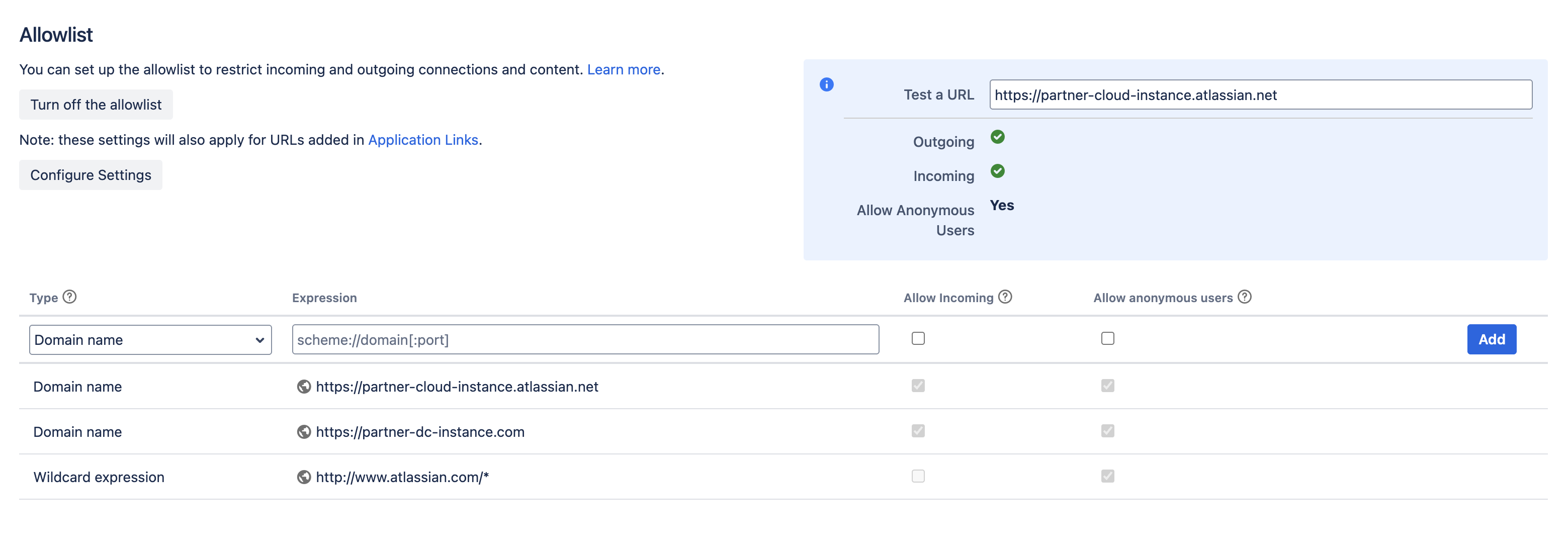
Follow these steps in order to either turn off the allowlist or add the base url of the remote instance.
-
Access the System settings by clicking on the settings icon in the top right corner
-
Click on Allowlist in the left sidebar menu
-
You can either choose to “Turn off the Allowlist”, however we do not recommend this for production instead
-
Go into the Allowlist configuration:
-
Add the base URL of the remote instance using one of these expression types:
-
Option 1: Domain name (recommended):
-
For Cloud:
https://partner-cloud-instance.atlassian.net -
For DC:
https://partner-dc-instance.com(usehttp://partner-dc-instance.com:8080if you have the application running on a specific port)
-
-
Option 2: Wildcard:
-
For Cloud:
https://partner-cloud-instance.atlassian.net/* -
For DC:
https://partner-dc-instance.com/*
-
-
-
Enable the checkbox to allow incoming requests
-
-
In order to validate the changes, please use the URL validator in the top right corner to ensure that both outgoing and incoming requests are accepted.
If the hostname of the instance you are using resolves into either a loop back or link local or any local address for some reason, these addresses also need to be added to the allowlist.
After performing these steps, please refresh the page of the sync connection screen and re-enter the connection details. It should properly proceed without issues now.