
The Content Manager is a new feature in Scroll Documents. This a central view that consolidates several management functions into one overview, allowing you to quickly see all pages within each version and translation and review their associated properties (e.g., workflow status, Context Keys, and assigned variants). To learn more about the Content Manager, see: Manage Page Trees
To access the Content Manager within the Document Manager:
-
Click Content,
-
or locate the specific version or translation you want to view and click Content Manager.
What You Can Do in the Content Manager
-
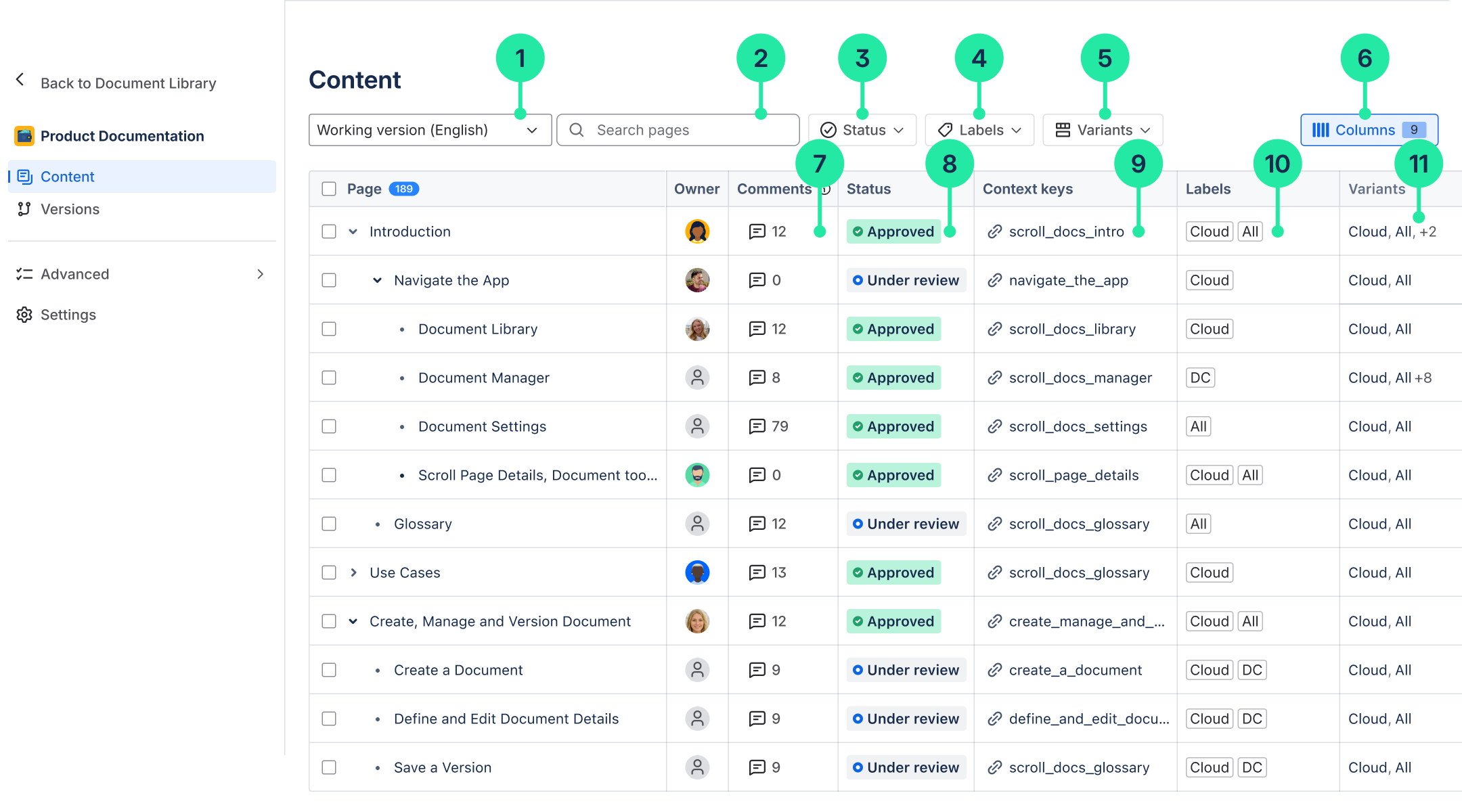
Filter the page tree by a specific version or language.
-
Search for pages within the version's page tree.
-
Filter pages by workflow status.
-
Filter pages by labels.
-
Filter pages by variants.
-
View and adjust the scope of the columns visible in the table.
-
Navigate to unresolved inline comments on a page.
-
View or change the status of a page.
-
View or copy the Context Key of a page.
-
See and change the labels on a page
-
View which variant a page belongs to.
For more information, read: Manage Page Trees