
Early Access: The AI Assistant is available for a small group of sites first. To enable it for your site → Sign up for early access.
The AI Assistant gives your visitors direct answers from your help center, in their own words and in a conversation. Think of it as a product expert who knows every published article and always shows where an answer comes from.
Visitors open the AI Assistant with Ask AI and get an answer next to the page they're reading. They can ask follow-up questions, and every answer links to the articles it used. When your content doesn't hold the answer, the AI Assistant says so instead of guessing.
The AI Assistant works with the Help Center theme. You don't need an API key: K15t provides access to the AI model, which runs on AWS Bedrock.
To turn it on for your site, see Enable the AI Assistant.
Use the AI Assistant in Your Help Center
The AI Assistant opens in a side panel next to the page, so the article stays in view. In wide browser windows, the panel sits beside the content. In narrower windows and on phones, it opens on top of the page.
Open the AI Assistant
Visitors can open the AI Assistant from these places:
-
Articles: Ask AI is the main button on every article.
-
Portal page: Ask AI sits next to the search bar.
-
Search: The search results include an Ask AI option that sends the search term to the AI Assistant.
Ask and follow up
Visitors type a question in their own words, like "How do I restrict a page to one group?", and the answer appears as it's written. They can ask follow-up questions, like "And how do I undo that?".
The AI Assistant reads each question together with the conversation so far.
The conversation stays open while visitors move between pages. If they come back within 48 hours, they can continue where they left off.
To start fresh, they click Start a new conversation.
Check the sources
Every answer lists its Sources below it. Sources link to the right version, variant, and language of the article.
When there's no answer
If your content doesn't answer the question, the AI Assistant tells visitors it couldn't find an answer in this help center. It doesn't make one up. It also declines requests that have nothing to do with your help center.
The panel is clearly labeled as AI and reminds visitors that answers can contain mistakes. It works with the keyboard and with screen readers.
How the AI Assistant Answers Questions
Every answer comes from your published content, never from the open internet.
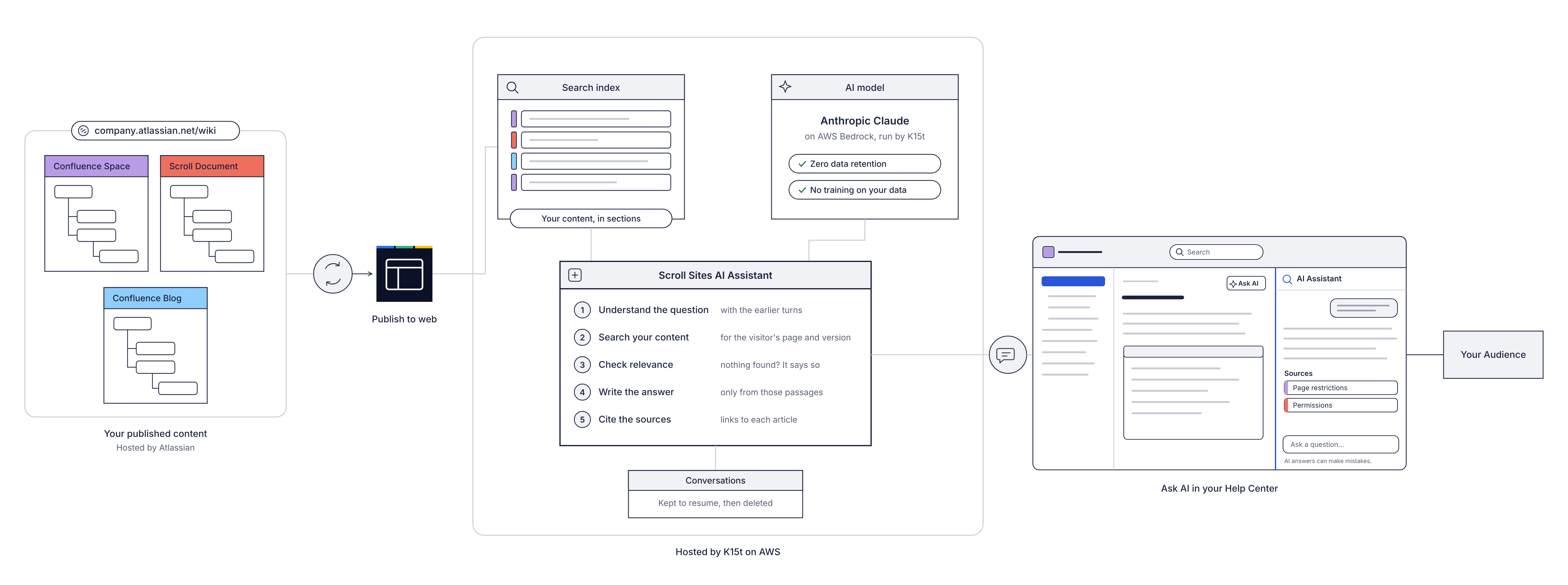
Your content stays in Confluence and is published to Scroll Sites. Everything the AI Assistant does happens in K15t's AWS environment: it searches the index of your published content, asks the AI model to write an answer from what it found, and sends the answer with its sources to the Ask AI panel in your help center.
For each question, the AI Assistant works through these steps:
-
Understand the question. A follow-up is read together with the earlier questions and answers.
-
Search your content. The AI Assistant searches your site's search index for the passages that fit best.
-
Check that something relevant was found. If nothing fits, the AI model isn't asked at all, and visitors are told there's no answer.
-
Write the answer. The AI model writes the answer only from the passages found, the page the visitor is on, and the conversation so far.
-
Show the sources. The sources appear underneath the answer.
Which content the AI Assistant uses
The AI Assistant uses the same content as your site search:
-
On an article: Answers come from the article's content source, version, variant and language. The article itself is used as extra context.
-
On other pages, like the home page: Answers come from your whole help center.
Pages that aren't in your search index aren't used, for example pages excluded from navigation and search, or pages with view restrictions in Confluence. The AI Assistant reads the text and code in your articles, not images, diagrams, or attachments.
Languages
Visitors can ask in any language. The AI Assistant answers in the language of the question.
To help the AI Assistant find the right answers, see Optimizing for searchability and retrieval (for standard and AI search) – Best Practices.
Privacy and Data Protection
The AI Assistant runs on AI models through Amazon Web Services (AWS) Bedrock, in the AWS environment that already hosts Scroll Sites. Questions, answers, and your content aren't used to train AI models, and AWS Bedrock doesn't store them after processing. The K15t Data Processing Addendum applies.
For details on models, data processing, sub-processors, and your responsibilities as the operator, see AI Assistant Privacy and Data Protection.
Known Limitations
The AI Assistant has these limitations in Early Access:
-
Like any AI tool, it can give incorrect or incomplete answers. Visitors should check important answers against the linked articles.
-
Visitors can't see or change which content source, version, or variant it searches.
-
You can't adjust the tone or style of answers yet.
-
It doesn't link to your support desk when it can't answer.
-
A conversation has a length limit. When it's reached, visitors start a new one.
-
It's only available in the Help Center theme.