
Scroll Sites 2026-05-04 advances Scroll Sites into a truly LLM-ready platform. We’re introducing tools that bridge the gap between your documentation and the AI tools your users rely on, making your help center sites more discoverable and interactive than ever before.
Highlights
AI Toolbox: Interaction at the Point of Need
Help your users find answers faster by letting them interact with your content using their favorite AI tools. Every article now features a prominent Use with AI menu, allowing visitors to transition seamlessly from reading to conversing with your content.
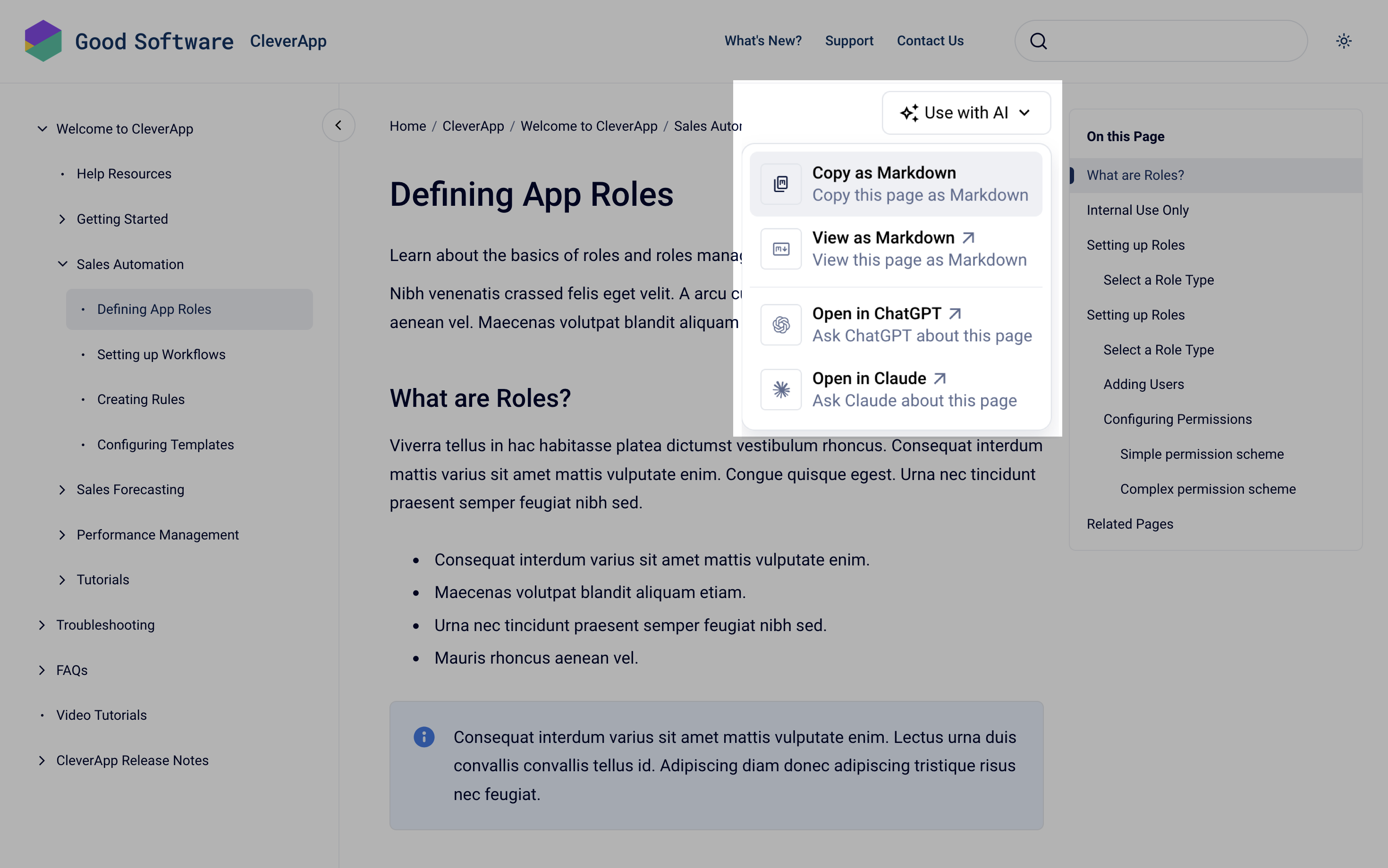
At a glance, the new options include:
-
Chat with ChatGPT or Claude
Instantly initiate a conversation about an article’s specific content. -
Markdown at your Fingertips
Users can now View or Copy articles as Markdown. Since Markdown is the "native language" of LLMs, this ensures that when users bring your content into an AI tool, the structure and context remain perfectly intact for the most accurate results.
These new options are available directly from each article, so that it’s fast for your visitors to transition from the help center to the AI tools of their choice.
Prefer not to show the menu at all?
You can hide it across your entire site with a snippet of custom CSS → Learn more
Automatically LLM-Optimized via llms.txt and llms-full.txt
Just as sitemap.xml and robots.txt guides search engines, your Scroll site now automatically generates llms.txt and llms-full.txt files at the root path.
In combination, they allow large language models to consume the site more effectively and intelligently - giving your users better results when they ask the AI tools of their choice questions about the content of your site.
Read more on How Is My Site Made LLMs-Ready?
How the Use with AI Menu Rolls Out To Your Existing Site
Sites set to live updates will get the Use with AI menu automatically with their next site update – no action needed on your end.
Sites set to manual updates won’t see the menu until you publish a site update that includes this version. Once that update goes live, the Use with AI menu will appear on your articles.
Cleaner URLs for Single-Version Sites
When your site only displays a single version of a Scroll Document, you can now leave the URL path of that version empty. The version segment will then disappear from your site URLs altogether – giving you cleaner, shorter, more readable links without an unnecessary version name.
This is useful when you only ever publish one version of your content and don’t want a version segment cluttering up the URL. As soon as you select a second version for the same content source, a unique URL path is required again for each version, so visitors always land on the right one.
Please refer to the Jira items below for more details on the individual improvements and bug fixes included in this release.
Improvements
-
STS-155: Initiate a chat with ChatGPT or ClaudeAI about a help center article directly from article
-
STS-183: As a site manager, I want a site's content to be ingested easily by LLMs - llms-full.txt
-
STS-182: As a site manager, I want a site to be easily crawl-able for LLMs (GEO) - llms.txt